Agent Loop: What It Is, How It Works, and How to Run One in Production
The agent loop is the cycle where an AI agent reasons, calls tools, observes results, and repeats. Learn how ReAct, Claude, and Codex loops work.

Alyssa Sutton
5 min read
The agent loop is the cycle where an AI agent reasons, calls tools, observes results, and repeats. Learn how ReAct, Claude, and Codex loops work.
The agent loop is the cycle where an AI agent reasons, calls tools, observes results, and repeats. Learn how ReAct, Claude, and Codex loops work.
Every AI agent you have used runs on the same mechanism. A model thinks, acts, checks what happened, and goes again. That mechanism is the agent loop, and understanding it is the fastest way to judge whether an agent is genuinely autonomous or a chatbot with a new label.
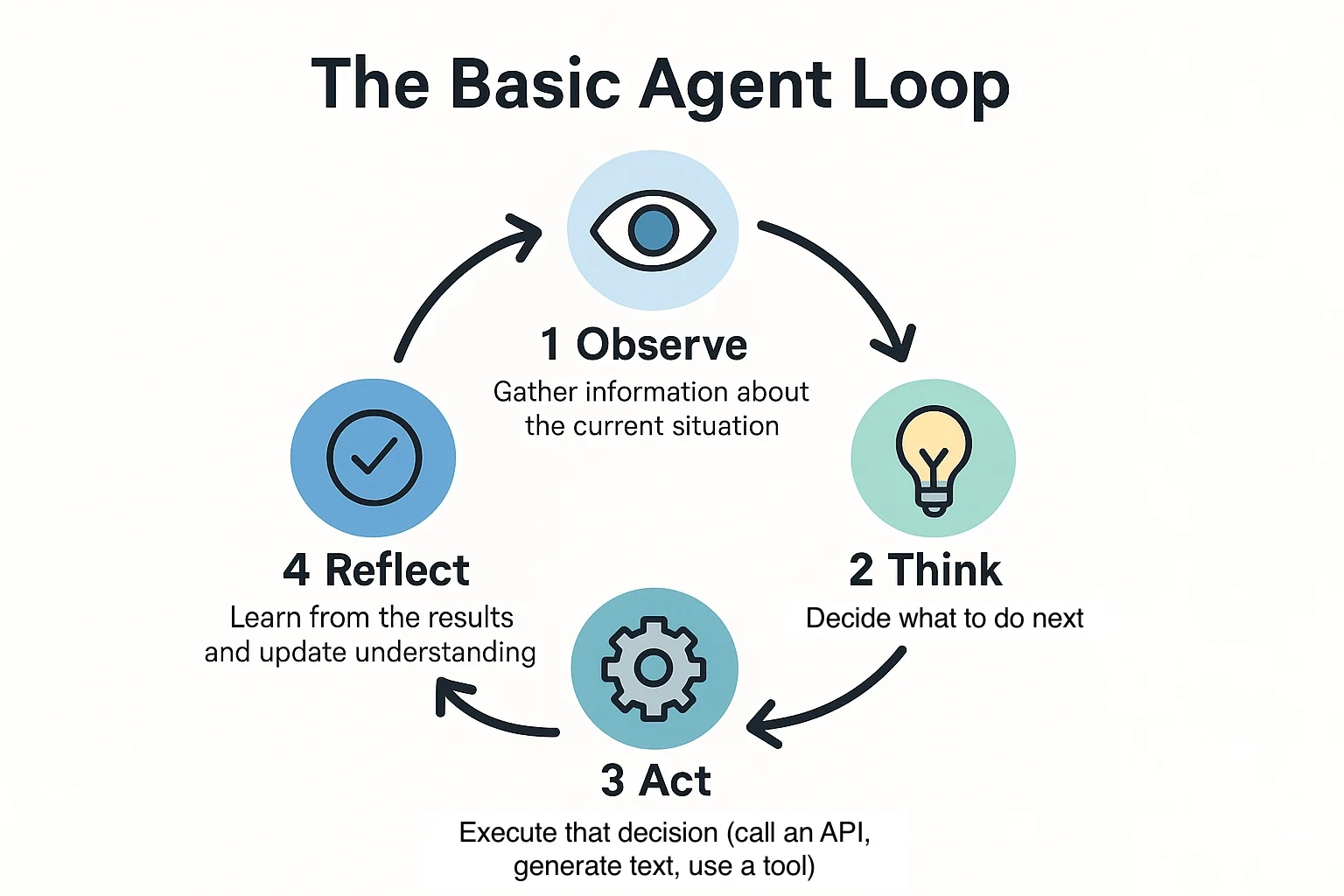
So, what is an agent loop? An agent loop is the iterative cycle at the core of every agentic AI system. The model reads its context, reasons about the goal, chooses an action such as a tool call, observes the result, and feeds that result into the next iteration. The cycle repeats until the task is complete or a stopping condition, such as a turn limit or budget cap, ends it.
Our guide explains the agent loop in plain terms, then covers the ReAct pattern, the Claude agent loop, the Codex agent loop, and the controls that keep loops safe and affordable. Designing a loop for a real workflow? Book a scoping call with JADA.
Vocabulary varies by vendor, but most descriptions reduce to the same stages:
In code, the whole pattern is a while loop. The model is called, any requested tools run, their results are appended to the conversation, and the loop continues until the model replies without requesting another tool. Anthropic's engineering team describes agents in nearly these terms: a model using tools based on environmental feedback, in a loop. The idea is simple, and most of the engineering effort goes into everything around it.
A chatbot handles one input and produces one output, with no mechanism to check whether an action worked or to change course. Ask it to find flights, compare them against loyalty points and book the best one, and it can discuss each step but cannot chain them.
An agent can, because the loop gives it three things a single pass lacks. It can iterate on results, so each tool output informs the next decision. It can recover from failure, so an empty search or an error triggers a new approach instead of a dead end. And it can decompose dependent tasks, where step three only makes sense after step two returns. The model may be identical in both cases. The architecture is what differs.
Not sure which of your workflows genuinely need a loop? JADA supports your agentic AI adoption needs by separating agentic use cases from ones a simple pipeline handles better.
The primary function of the reasoning stage in an agentic AI loop is to decide what happens next. The model evaluates the goal, the accumulated context, and the latest observation, then selects the next action, including which tool to call and with what arguments, or concludes the task is finished and returns a final answer.
Reasoning is the control point of the loop. It converts raw observations into decisions, updates the plan when something unexpected occurs, and judges whether the objective has been met. A weak reasoning step produces the failures people associate with agents: repeated identical tool calls, premature stopping, or wandering off task. This is why prompt design, tool descriptions, and effort settings all attach to this step. It is also the part that benefits most from the ReAct pattern below.
A ReAct loop interleaves reasoning traces with actions. At each step, the model writes a short thought, takes an action such as a search or tool call, reads the observation, and reasons again. The name combines "reasoning" and "acting."
On the ALFWorld and WebShop benchmarks, ReAct beat imitation and reinforcement learning baselines by absolute success-rate margins of 34% and 10%, using only one or two in-context examples. The result mattered because it showed that letting a model reason between actions, rather than acting blindly or reasoning without acting, measurably improves outcomes. Thinking and acting reinforce each other, so the reasoning trace also gives humans something to audit.
Nearly every modern agent framework implements some form of this loop, whether it calls it ReAct, a tool-calling loop, or an orchestration layer. The names differ, but the shape does not.
The Claude agent loop is the execution cycle behind Claude Code and the Claude Agent SDK. Claude receives the prompt, system instructions, tool definitions, and history, then either answers or requests tool calls. The SDK runs those tools, returns the results, and repeats until Claude produces a response with no tool calls.
Anthropic's documentation calls each full round trip a turn. A quick question might take one or two turns. A task like refactoring a module and updating its tests can chain dozens of steps, reading files, editing code, and re-running tests. The loop ends with a result message carrying the output, token usage, cost, and a status that tells you whether the task succeeded or hit a limit.
What makes this loop production-relevant is the set of levers around it:
The Codex agent loop is the orchestration logic in OpenAI's Codex CLI. Each turn assembles inputs, runs model inference, executes any tool calls the model requests, appends the results, and queries the model again until it emits a final assistant message.
Unrolling the Codex agent loop, the process repeats until the model stops emitting tool calls and produces a message for the user. Because tools can modify the local environment, the real output is often the code written or edited on disk, and the closing message signals that control returns to the person. The post also covers the practical costs of long sessions: context growth, prompt caching, and automatic compaction.
Set side by side, the two loops look almost identical, which supports the point that the pattern has converged.
The basic loop extends in a few directions:
The trade-off is cost. Anthropic's own data shows agents use about 4x the tokens of chat interactions, and multi-agent systems about 15x. Complexity should be earned by measured improvement, not assumed.
Loops that work in a demo fail in predictable ways once volume, real systems, and real consequences arrive:
Layered stopping conditions are the difference between an agent and a liability:
Alongside these, keep structured logs of every reasoning step, tool call, argument, and result. Organizations operating under frameworks such as the NIST AI Risk Management Framework, ISO/IEC 42001, or the EU AI Act typically need that audit trail as evidence of oversight.
Building agents for a regulated environment? JADA designs the approval gates, logging, and permissions into the Build phase, then runs them through Manage.
A loop is the wrong tool for a fixed, predictable sequence, where a deterministic pipeline is cheaper, faster, and easier to audit. It is also wrong for single-step tasks, where one model call and one tool call suffice, and for latency-critical paths, because every iteration adds model latency.
The industry direction is to start with the simplest architecture that solves the problem and add a loop only when the number of steps cannot be predicted in advance.
Before you build or buy, confirm each of these:
JADA is a boutique agentic AI company that designs, builds, and manages custom AI agents. What that means for your loop:
If you have a workflow you suspect needs an agent, the fastest next step is a short conversation about scope. Talk to our experts today!
ReAct is a specific, well-known way of running an agent loop, in which reasoning and acting are interleaved at every step. "Agent loop" is the broader category, covering ReAct, plain tool-calling loops, plan-and-execute designs, and multi-agent variants. Every ReAct loop is an agent loop, but not every agent loop reasons in visible ReAct format.
Its job is to decide the next step. The reasoning stage interprets the goal, context, and latest result, then chooses an action or concludes the task is done. It is the control point that turns observations into decisions and revises the plan when reality diverges from it.
The core cycle is the same: model, tool calls, results fed back, repeat until a final message. The differences are in the surrounding harness. The Claude Agent SDK exposes explicit turn and budget caps, hooks, and permission modes as developer controls. Codex documents its approach to prompt caching and context compaction for long sessions.
Layer several limits: a maximum number of turns, a per-run cost budget, no-progress detection, and a goal-completion check. Add human approval for high-impact actions. Set these limits deliberately, because some SDKs default to no limit.
Any system that must take multiple dependent steps and adapt to results does, and that is what makes it an agent. But many business workflows follow a fixed sequence and are better served by a deterministic pipeline. If you cannot predict the number of steps in advance, a loop is justified. If you can, it usually is not.

